AI vs Manual vs Hybrid Workflow in 3ds Max: Which is Right for You?
Explore AI, manual, and hybrid workflows in Autodesk 3ds Max compare speed, control, & quality to choose the best 3D rendering process.

If you are working in Autodesk 3ds Max today, choosing the right workflow can directly impact your speed and quality. With AI rising fast, many artists are unsure what to rely on.
The reality is simple. Each approach has its place, but the best results today come from understanding all three.
AI Workflow - Fast and efficient for concepts, quick iterations, and reducing repetitive tasks, but limited control for final output.
Manual Workflow - High precision, full control, and best for photorealistic final renders, but time consuming and slower to iterate.
Hybrid Workflow - Combines AI speed with manual control, making it the most practical approach for real production work.
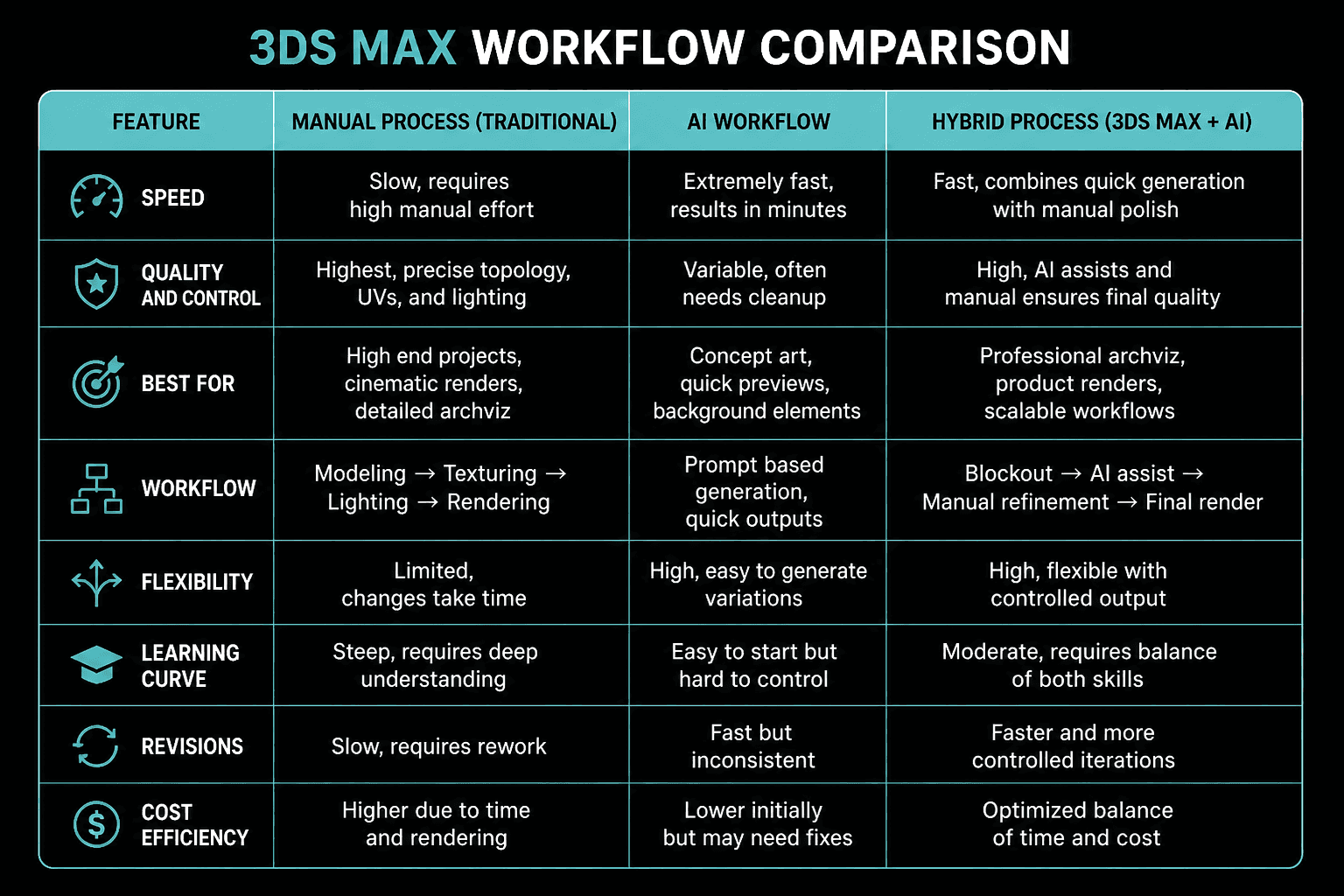
In this blog, I will break down each workflow, where it works best, where it fails, and how you can use them together to improve your 3ds Max pipeline.
What is an AI Workflow in 3DS Max?
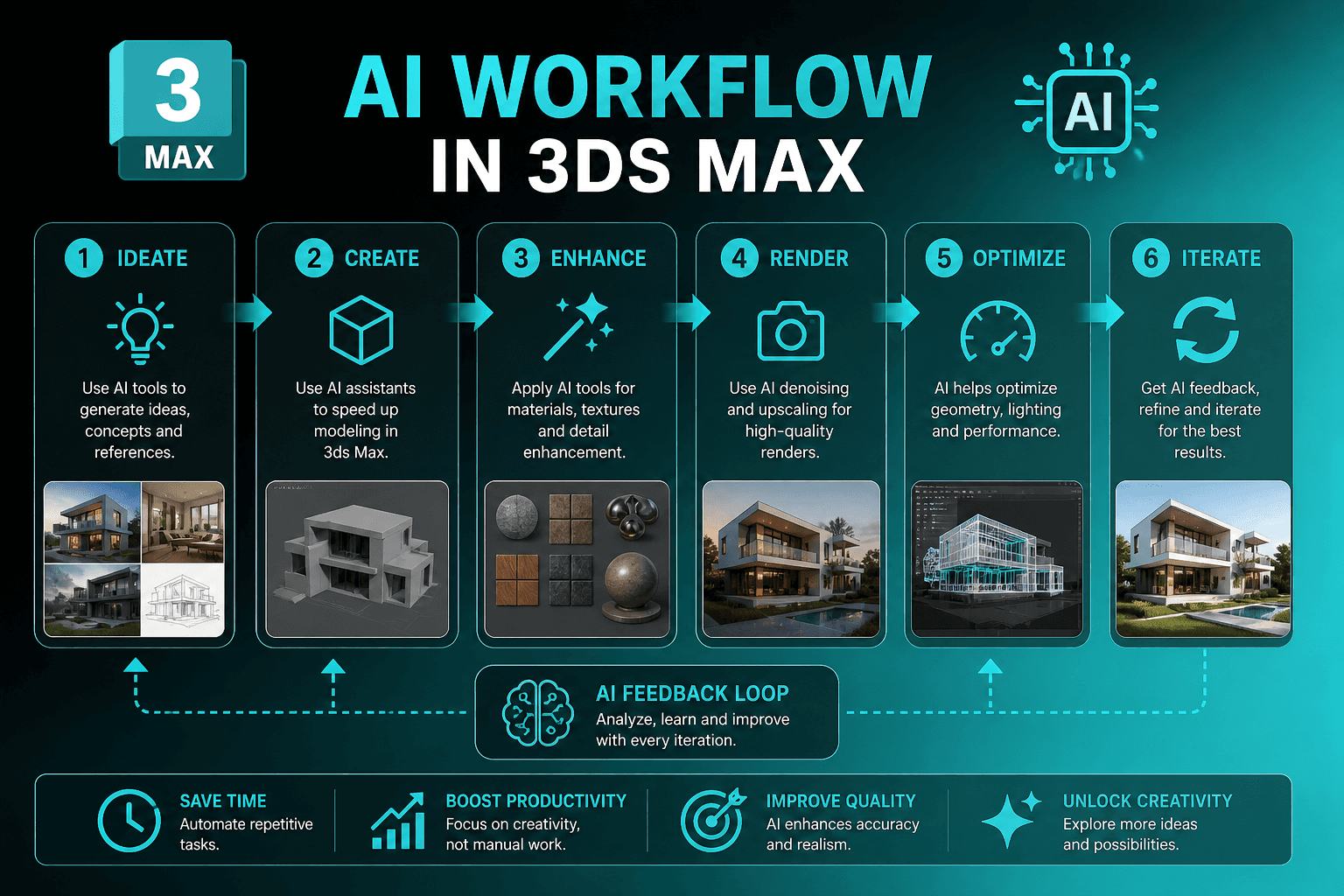
An AI workflow in Autodesk 3ds Max means using AI powered tools to speed up parts of your process like texturing, lighting, asset creation, or even generating full scene ideas. Instead of building everything from scratch, you let AI handle the heavy lifting in the early stages.
In practice, artists are not replacing 3ds Max with AI. They are using AI alongside it to move faster.
Where AI is Used for 3D?
Generating textures and materials from prompts.
Creating quick lighting or mood variations.
Concepting scenes or environments.
Assisting with asset creation and background elements.
What are the Pros of AI Workflow in 3DS Max?
Speed - You can generate ideas and variations in minutes instead of hours.
Faster Iteration - Great for exploring multiple directions before locking a final look.
Reduced Repetitive Work - Tasks like basic texturing or background setup become much quicker.
What are the Cons of AI Workflow in 3DS Max?
Lack of Control - You do not always get exactly what you want.
Inconsistent Quality - Results can look good at first but break under closer inspection.
Not Production Ready - AI outputs often need manual cleanup before final rendering.
Examples of AI Workflow for 3DS Max
You generate multiple mood variations for an interior using AI, then rebuild the final scene properly in 3ds Max.
You create rough textures using AI and refine them manually for better realism.
You test lighting styles quickly before setting up a proper render using engines like V-Ray or Corona Renderer.
AI workflow is powerful for starting fast, but on its own, it rarely delivers the level of control and quality needed for final output.
What is a Manual Workflow in 3DS Max?
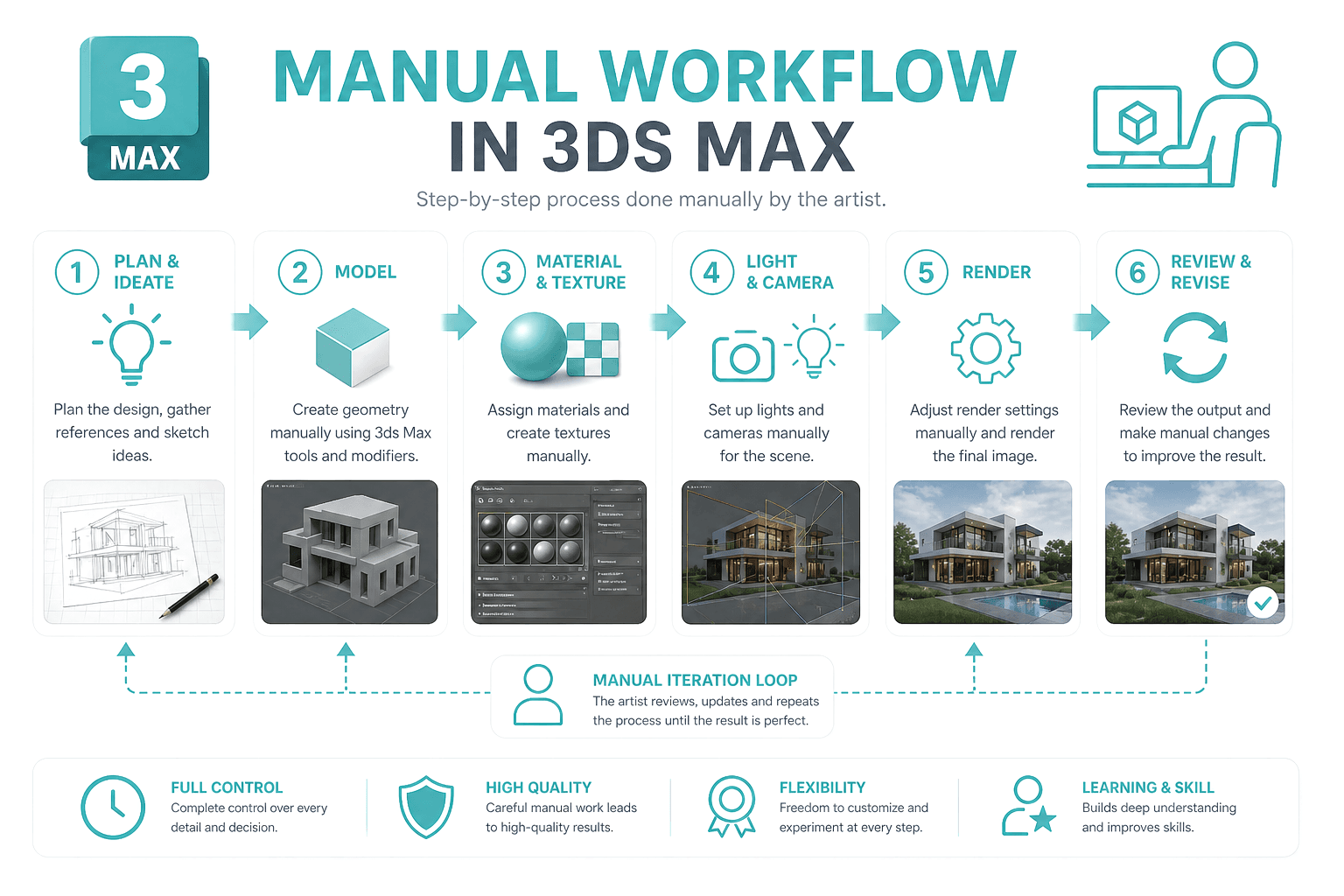
A manual workflow in Autodesk 3ds Max means building everything yourself from the ground up. You control modeling, materials, lighting, camera, and rendering without relying on automation. This is the traditional approach that most experienced artists are trained in.
In real production, this is where quality and precision come from.
Where Manual Workflow is Used?
Modeling accurate geometry from CAD or references.
Creating detailed materials and UV mapping.
Setting up realistic lighting and cameras.
Rendering using engines like V-Ray, Corona Renderer, or Arnold.
What are the Pros of Manual Workflow in 3DS Max?
Full Control - Every detail is in your hands, from geometry to final render.
High Quality Output - Best for photorealism and client ready visuals.
Consistency - Reliable results across multiple scenes and revisions.
What are the Cons of Manual Workflow in 3DS Max?
Time Consuming - Complex scenes can take hours or days to complete.
Slower Iteration - Making multiple changes or variations takes effort.
Steep Learning Curve - Requires strong understanding of modeling, lighting, and rendering.
Examples of Manual Workflow for 3DS Max
Building an interior scene from CAD, setting up materials manually, and rendering a final photorealistic image.
Creating a product render with precise lighting and reflections for marketing use.
Producing final client deliverables where accuracy and realism are critical.
Manual workflow is still the backbone of professional 3D work, especially when the final output needs to be precise and production ready.
What is a Hybrid Workflow in 3DS Max?

A hybrid workflow in Autodesk 3ds Max combines AI tools with traditional manual techniques. Instead of choosing one over the other, you use AI where it saves time and switch to manual work where control and quality matter.
This is how most experienced artists and studios are working today. You move fast in the early stages and then refine everything to production quality inside 3ds Max.
Where Hybrid Workflow is Used?
Generating concepts, textures, or mood variations using AI.
Blocking scenes quickly, then refining geometry manually.
Testing lighting ideas before setting up final renders.
Using AI outputs as a base and polishing them for accuracy.
What are the Pros of Hybrid Workflow in 3DS Max?
Balanced Speed and Quality - You get faster results without sacrificing final output.
Efficient Iteration - Quickly explore ideas and still deliver precise visuals.
Scalable Workflow - Ideal for handling multiple projects and tight deadlines.
What are the Cons of Hybrid Workflow in 3DS Max?
Workflow Complexity - Switching between tools can feel messy at first.
Learning Curve - You need to understand both AI tools and core 3D fundamentals.
Integration Challenges - Not all AI outputs fit cleanly into 3ds Max without adjustments.
Examples of Hybrid Workflow in 3DS Max
Creating multiple AI based mood boards for a client, then building the final approved scene manually in 3ds Max.
Generating textures using AI and refining them for realistic rendering.
Testing lighting styles quickly, then setting up final renders using V-Ray or Corona Renderer.
Step-by-Step Hybrid Workflow in 3DS Max
A simple hybrid pipeline keeps things structured while taking advantage of both speed and control.
Concept and References - Use AI tools to explore styles, moods, and variations.
Base Scene Setup - Block geometry and layout inside 3ds Max.
AI Assisted Enhancements - Generate textures, lighting ideas, or background elements.
Manual Refinement - Clean topology, adjust materials, and fine tune lighting.
Final Rendering - Render using engines like V-Ray, Corona Renderer, or Arnold.
Post Production - Enhance final output in tools like Adobe Photoshop.
This kind of pipeline gives you the best of both worlds. You reduce production time while still delivering high quality, client ready results.
Why Choosing the Right 3DS Max Workflow Matters?
“I don’t know which workflow to choose”
Common confusion between AI hype and traditional methods can lead to wasted time and wrong learning paths.“It can take days, weeks, or months to model complex scenes”
Manual workflows can slow down delivery, especially when working under tight deadlines.“AI results look good… but not accurate”
AI outputs often lack precision, making them unreliable for final production work.“Clients like it but want small changes”
Frequent revisions make inefficient workflows frustrating and time consuming.“Workflow is messy (imports, assets, pipeline)”
Unstructured pipelines can create issues with files, optimization, and consistency.“Learning curve is overwhelming”
Mastering tools like Autodesk 3ds Max takes time, while AI tools alone are not enough.“Rendering time = money”
Choosing the wrong workflow can increase costs and reduce overall efficiency.
What are the Common Mistakes You Should Avoid?
Working in Autodesk 3ds Max, most problems are not about tools, they come from poor workflow decisions. Here are the mistakes I see artists repeat often:
Using AI for final output - AI is great for ideas, but relying on it for final renders usually leads to poor quality and rework.
Jumping into details too early - Spending hours on small details before locking composition and lighting slows everything down.
Ignoring scene optimization - Heavy geometry, unoptimized textures, and bad asset management can kill performance and render time.
No clear workflow plan - Switching randomly between modeling, texturing, and lighting creates confusion and wasted effort.
Over-reliance on manual work - Trying to do everything manually without using AI or smart tools reduces efficiency.
Poor revision strategy - Not planning for client changes leads to repeated rework and frustration.
Bad asset management - Missing textures, broken paths, and messy files can break your pipeline.
Skipping lighting tests - Going straight to final render without testing lighting setups wastes a lot of time.
Not using the right render engine settings - Misconfigured settings in tools like V-Ray or Corona Renderer can increase render time without improving quality.
Avoiding these mistakes alone can significantly improve your speed, quality, and overall workflow efficiency.
Conclusion
There is no single perfect workflow in Autodesk 3ds Max, but there is a smarter way to work. AI helps you move fast, manual workflows give you control, and hybrid brings the best of both together. The key is to choose based on your project, not habit.
When you align your workflow with your goals, you reduce rework, save time, and improve output quality. That is what separates a struggling pipeline from a scalable one.
Speed Up Your Workflow with Flux Render Farm
Even with the right workflow, rendering can still slow you down. That is where Flux Render Farm fits in.
Get cost and render time before your final render
Scale your renders without hardware limits
Reduce render time and handle multiple projects easily
Support your hybrid workflow with faster turnaround
Get early access to Flux Render and start building a faster, more efficient 3ds Max pipeline today.

Frequently Asked Questions
Can AI completely replace manual work in Autodesk 3ds Max?
No. AI can speed up early stages like concepts and variations, but manual work is still needed for accuracy, control, and final production quality.
What AI tools actually work well with 3ds Max workflows?
Tools for texture generation, lighting ideas, and concept creation work best. They support the process but do not replace core 3ds Max tasks.
How do I start building a hybrid workflow as a beginner?
Start with basic 3ds Max fundamentals, then use AI for simple tasks like references or textures. Gradually combine both as you get comfortable.
Will using AI affect the quality of my final renders?
It can if you rely on it fully. When used correctly with manual refinement, it actually improves speed without reducing quality.
How do studios manage hybrid workflows in real production pipelines?
They use AI for faster iteration and idea generation, then rely on experienced artists to refine, optimize, and produce final renders inside 3ds Max.