What are the Hidden Costs of Cloud Render Farms?
Upload/download fees, storage, licensing, failed renders, priority queues, preprocessing time, etc. what pricing calculators don’t show.

When people first look at a cloud render farm, it feels simple: upload your files, hit render, and pay for the time used. The pricing often looks clear and predictable. But once you actually start using it for real projects, the final cost can be higher than expected.
The reason is simple, many small costs are not shown upfront. Things like uploading and downloading files, storing your project data, software licenses, or even failed renders can quietly add to your bill. If you’re working on multiple versions or making frequent changes, these extra costs can grow even faster.
This doesn’t mean cloud render farms are bad, they’re still a powerful and time-saving solution. But it’s important to understand the full picture before you rely on them for your projects.
In this blog, we’ll break down the hidden costs of cloud render farms in a simple way, so you know exactly what to expect and how to avoid surprises.
Hidden Costs You Should Know Before Hitting Render
Upload & Download Fees
Moving files to and from the render farm isn’t always free. Large scenes and outputs can slowly increase your total cost.
Storage Costs
Your files stay on the server unless you delete them. Keeping assets and old renders can lead to ongoing charges.
Software Licensing
Some platforms charge extra to use tools like V-Ray or Redshift, even if you already own them.
Failed Renders & Re-renders
If a render fails or has errors, you still pay for the time used. Fixing and rendering again adds more cost.
Priority Queue Fees
Faster rendering options cost more. Using express or priority queues can quickly increase your bill.
Preprocessing Time
Before rendering starts, your scene is prepared and checked. This time may still be billed.
Iteration Costs
Every change means re-uploading and rendering again. Multiple revisions can quietly multiply costs.
Minimum Billing Time
Some farms charge a minimum time, even for short renders, making small jobs more expensive.
GPU vs CPU Pricing
GPUs can be faster but not always cheaper. Choosing the wrong setup can waste money.
Output Size & Render Passes
High-quality formats and extra passes increase render time, storage, and download costs.
Egress Bandwidth Costs
Downloading your final renders and files can add extra charges. The more data you export, the higher the cost.
Paid Support
Some platforms charge extra if you need help with setup, errors, or optimization.
What are the Core Pricing Units for Cloud Rendering?
Before looking at hidden costs, it helps to understand how render farms charge you. Most platforms base pricing on the time and power used to render your scene.
You’ll usually see units like per hour, per node, or GPU/CPU usage. Some may also use terms like GHz hours or GPU hours, which simply measure how much computing power your project uses over time.
Let’s say your scene takes 2 hours on a GPU to render, and the cost is $2 per GPU hour.
That means: 2 hours × $2 = $4 total render cost
Now if you increase quality or add more effects and it takes 4 hours instead, your cost doubles to $8.
The important thing to know is:
The longer and heavier your scene, the more you pay
Once you understand these basic units, it becomes much easier to see where hidden costs start adding up.
What are the Key Factors That Impact Render Farm Costs?
Render farm pricing depends on several important factors:
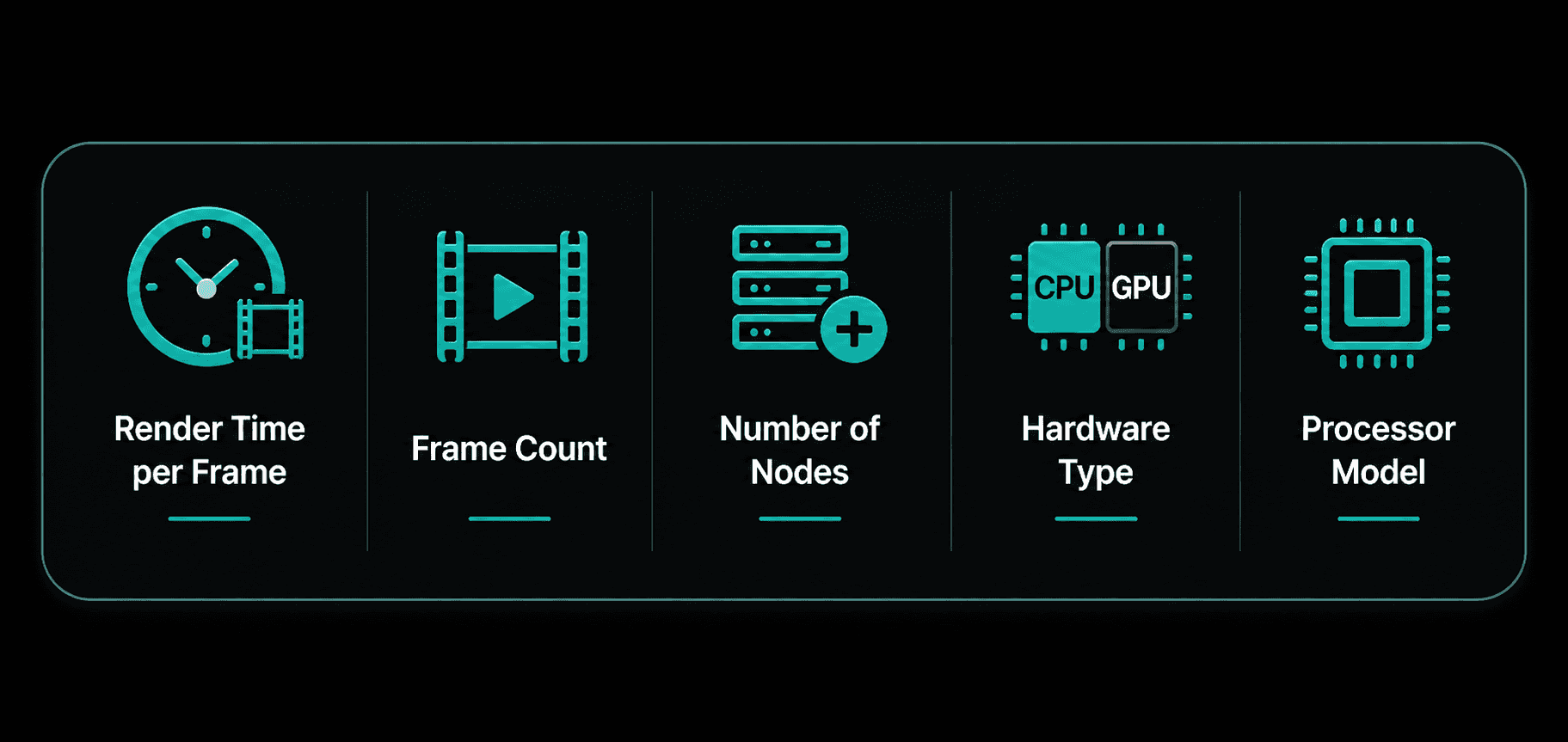
Render Time per Frame – The longer each frame takes, the higher your total cost.
Frame Count – More frames in your project will increase the overall price.
Number of Nodes – Adding more nodes speeds up rendering but also increases cost.
Hardware Type – Choosing between CPU and GPU affects both performance and pricing.
Processor Model – More powerful or newer hardware usually comes at a higher cost.
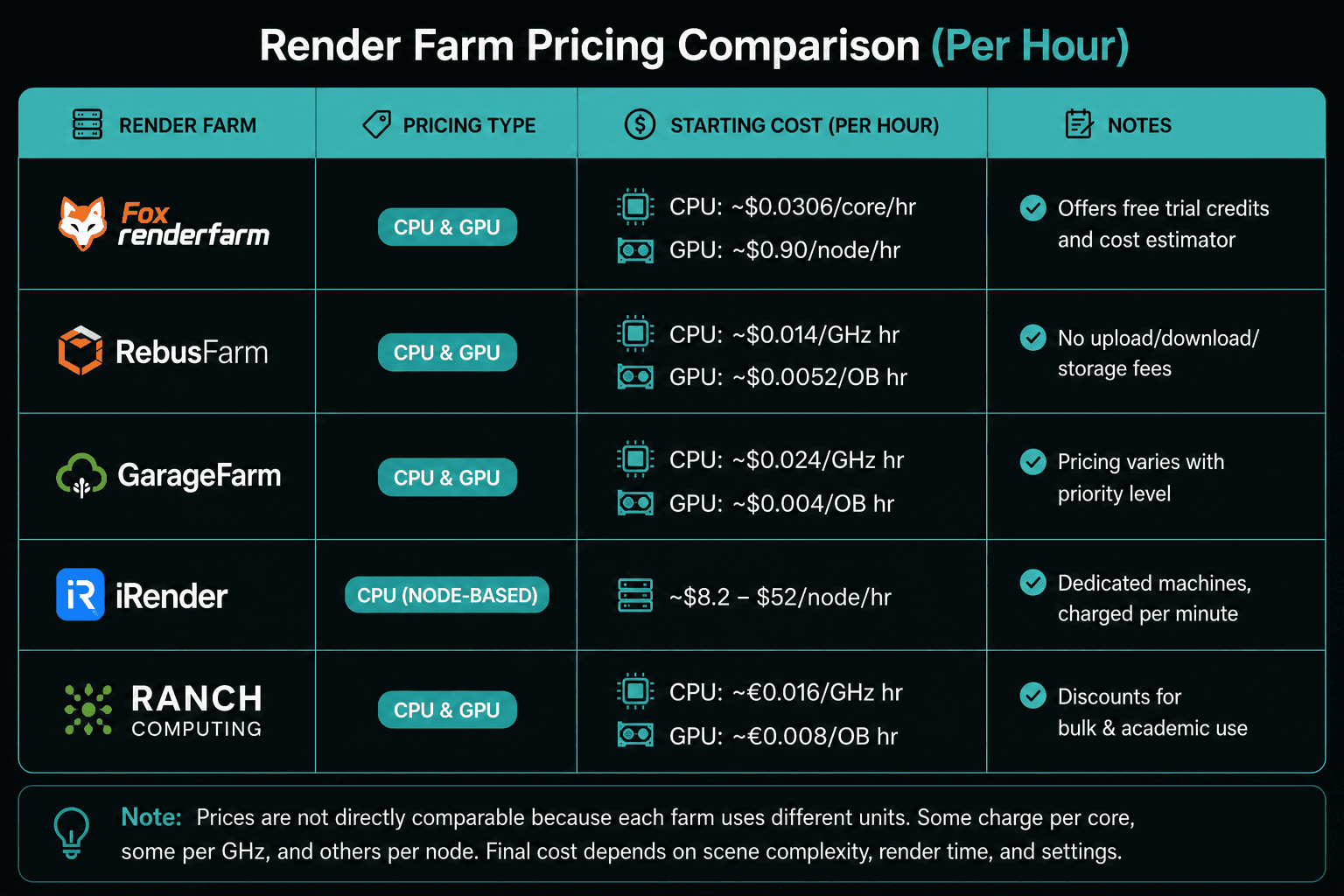
Quick Summary of Render Farm Costs
How is Flux Render Different from All other Render Farms?
Free Testing - Try the platform before you commit. Test your scenes and understand performance without spending upfront.
Best Support - Get quick and helpful support when you need it. No waiting for hours if something goes wrong.
Upfront Cost & Time Estimate - Know your cost and render time before you start. No surprises after the job is done.
User-Friendly Workflow - Simple and easy process from upload to render. No complicated setup or technical steps.
Revision Control System - Re-render a few frames for free if something doesn’t look right. Fix small issues without paying again.
Get early access to Flux Render and experience faster, smarter rendering, before everyone else.

Frequently Asked Questions
Is GPU rendering always cheaper than CPU rendering?
Not always. GPU is faster, but pricing depends on your scene. Some projects are still more cost-effective on CPU.
How do I estimate my final render cost before starting?
Use platforms that show cost upfront. With Flux Render, you get a clear cost and time estimate before you start rendering.
How can I reduce my cloud rendering costs?
Optimize your scene, lower unnecessary quality settings, and avoid multiple re-renders. Planning ahead saves money.
Do I get charged if my render fails or crashes?
In most cases, yes. You are charged for the compute time used before the failure.
How much does it cost to render a typical animation project?
It varies a lot based on frames, quality, and render time. Small projects can cost a few dollars, while larger ones can go much higher.
Are there any free render farms or trial options available?
Some platforms offer trial credits. With Flux Render, you can test your scene for free before committing.
What happens if some frames don’t render correctly?
Usually, you need to re-render those frames and pay again. With Flux Render, you can fix and re-render a few frames for free.
Which is better: cloud rendering or building my own render farm?
Cloud rendering is more flexible and scalable. Building your own setup has high upfront cost and maintenance.
How do I choose between different render farms?
Look at pricing clarity, support, ease of use, and features. Flux Render stands out with upfront pricing and a simple workflow.
Is there a way to test a render farm before paying?
Not all platforms offer this. Flux Render allows free testing so you can check performance before spending.