

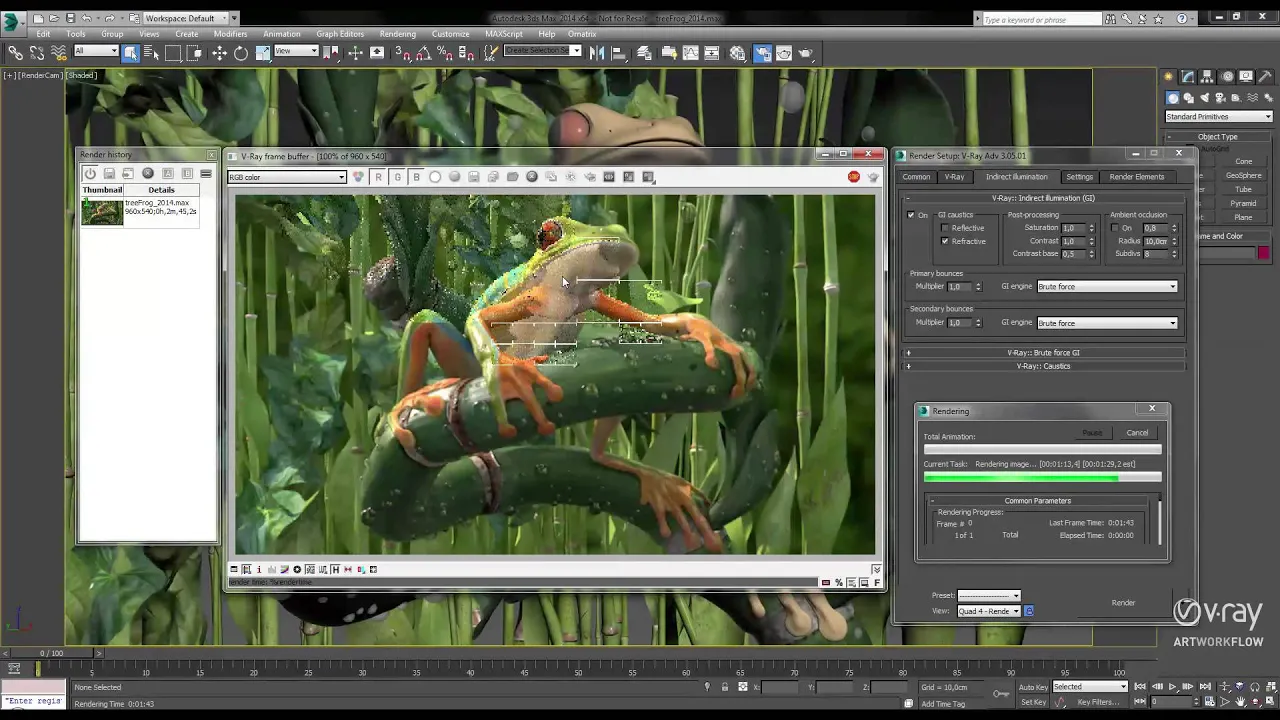
What is Path Tracing and How is it Different from Ray Tracing?
Path tracing is a rendering method that creates realistic lighting, shadows, and reflections by simulating light behavior.
Creating realistic 3D renders is no longer just about good models and materials. Lighting plays the biggest role in making a scene feel real, and this is where Path Tracing becomes important.
If you work in ArchViz, animation, product rendering, or VFX, you have probably heard people talk about Path Tracing and Ray Tracing quite often. While both technologies help create realistic lighting and reflections, Path Tracing takes realism to the next level by simulating how light naturally behaves in the real world.
Today, many modern render engines like Blender Cycles, Unreal Engine, Octane, and V-Ray use Path Tracing to produce cinematic quality renders with accurate shadows, reflections, and global illumination.
In this guide, we will explain what Path Tracing is, how it works, how it is different from Ray Tracing, and why it is widely used in professional 3D rendering workflows.
What is Path Tracing?
Path Tracing is an advanced rendering technique that creates highly realistic images by simulating how light behaves in the real world. It traces the path of light from the camera as it bounces, reflects, and interacts with different surfaces to produce natural lighting, shadows, and reflections.
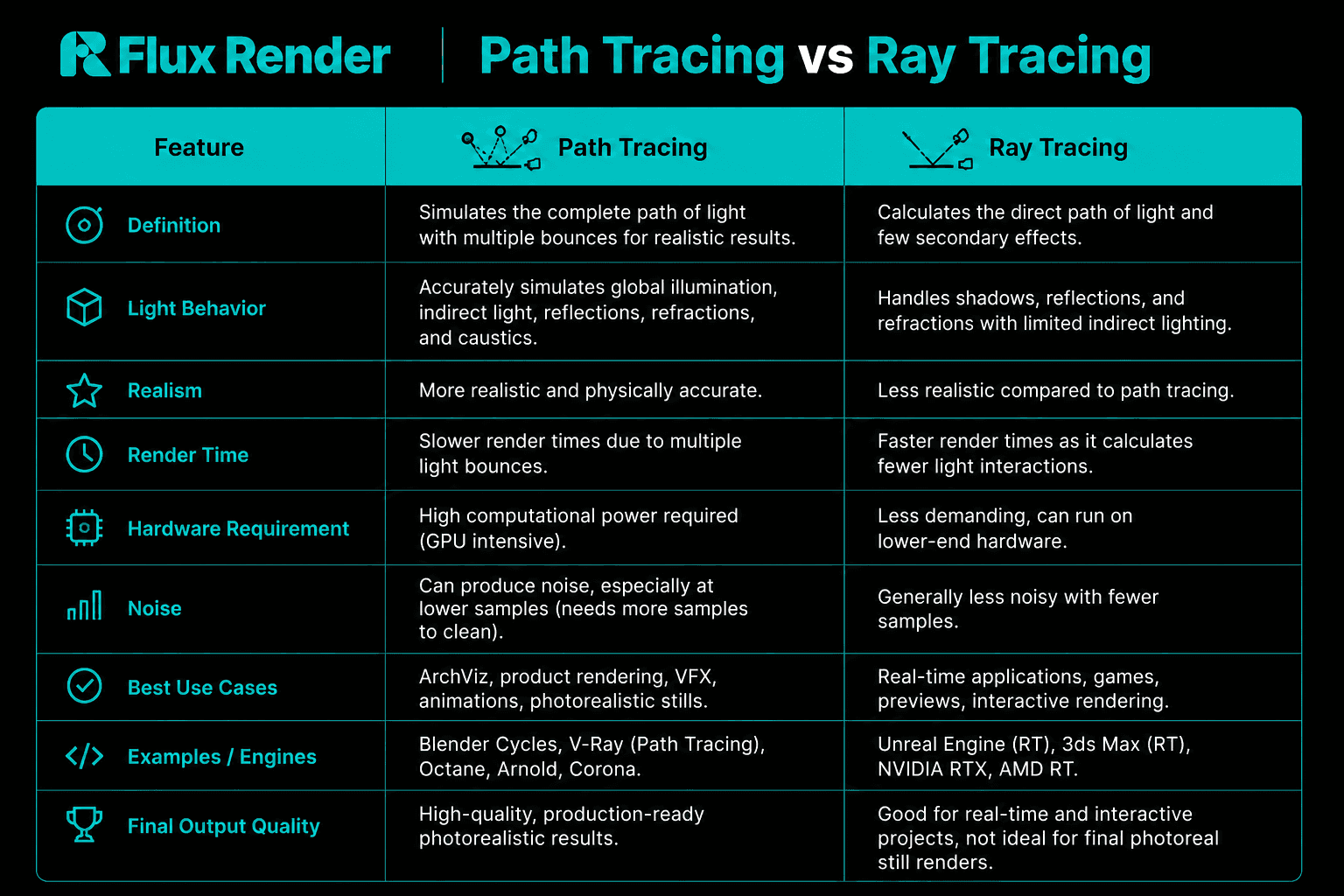
Path Tracing vs Ray Tracing
How Does Path Tracing Work?
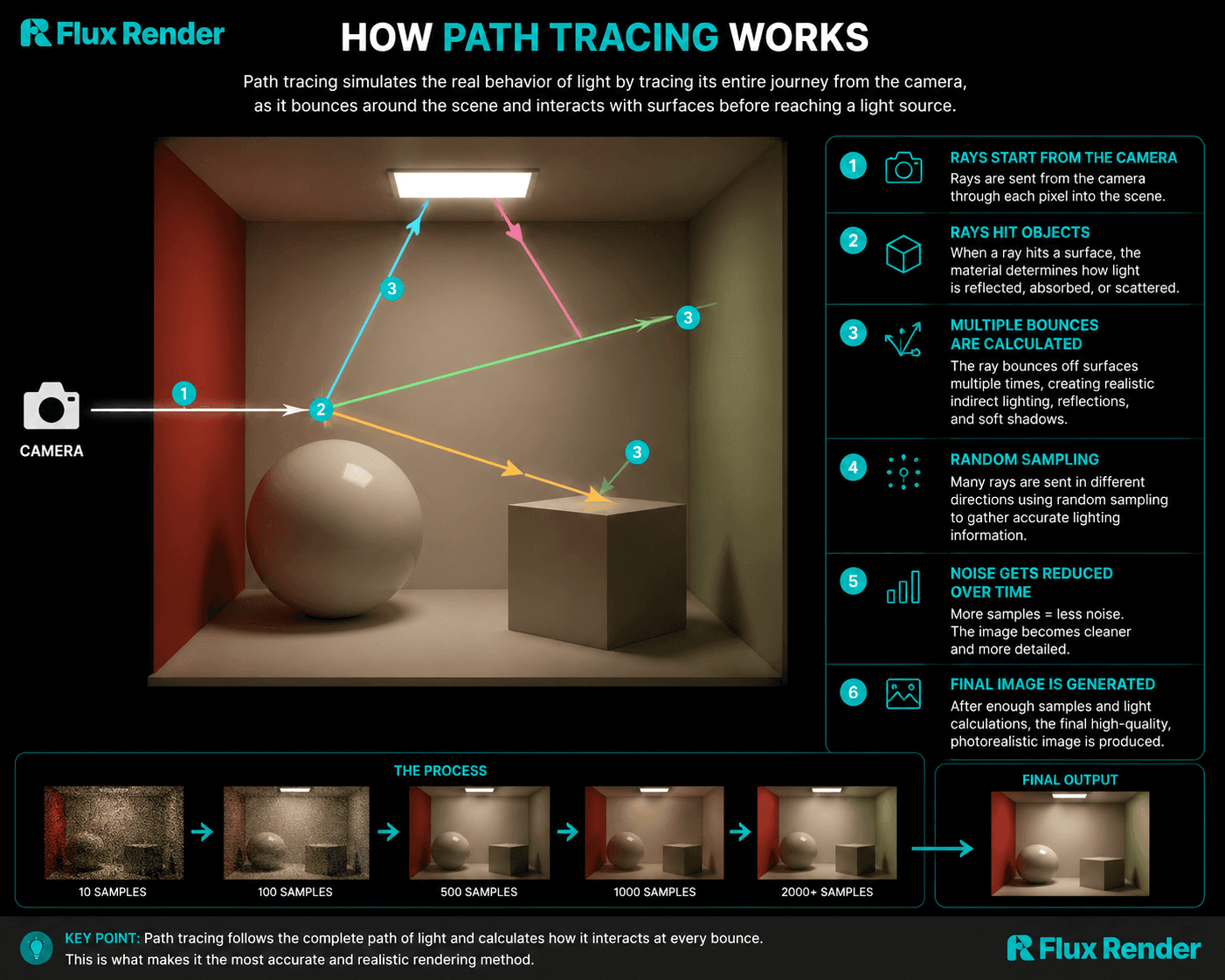
Path Tracing works by simulating the real behavior of light inside a 3D scene. Instead of calculating only direct lighting, it follows the complete journey of light as it bounces around objects, reflects from surfaces, passes through glass, and finally reaches the camera.
Here is a simple breakdown of how it works:
1. Rays Start From the Camera
The render engine shoots rays from the camera into the scene to determine what each pixel should display.
2. Light Rays Hit Objects
When a ray hits a surface, the renderer calculates how the material reacts to light. Different materials reflect, absorb, or scatter light differently.
3. Multiple Light Bounces Are Calculated
Unlike basic rendering methods, Path Tracing calculates indirect lighting by allowing rays to bounce multiple times between surfaces. This creates realistic global illumination, color bleeding, reflections, and soft shadows.
4. Random Sampling Creates Realism
Path Tracing uses random sampling to simulate natural light behavior. The renderer sends many rays in different directions to gather accurate lighting information.
5. Noise Gets Reduced Over Time
At lower samples, renders may appear grainy or noisy. As more samples are calculated, the image becomes cleaner and more detailed.
6. Final Image Is Generated
After enough light calculations and samples, the renderer produces a highly realistic image with physically accurate lighting and reflections.
Because Path Tracing calculates millions of light interactions, it requires significant GPU power and longer render times, especially for complex ArchViz and VFX scenes. This is why many artists use cloud render farms to speed up Path Tracing workflows.
How to Use Path Tracing in 3D Rendering?
Using Path Tracing in 3D rendering is much easier today because most modern render engines already support it. Whether you are creating architectural visualizations, product renders, animations, or VFX shots, Path Tracing helps produce more realistic lighting and reflections with physically accurate results.
Here is how artists typically use Path Tracing in a 3D workflow:
1. Choose a Render Engine That Supports Path Tracing
Many popular render engines use Path Tracing technology, including:
Blender Cycles
V-Ray
Octane Render
Arnold
Redshift
Unreal Engine Path Tracer
Each engine has different settings and performance levels, but the core rendering process is similar.
2. Build and Optimize Your Scene
Before rendering, create your 3D scene with proper:
Models and geometry
Realistic materials
HDRI or physical lighting
Correct textures and scale
A well optimized scene helps reduce render times and improves lighting accuracy.
3. Enable Path Tracing Mode
Inside your render engine settings, switch the renderer to Path Tracing mode. Some software may call it:
Path Tracer
Progressive Rendering
Physically Based Rendering (PBR)
Once enabled, the renderer starts calculating realistic light bounces and global illumination.
4. Adjust Samples and Light Bounces
Path Tracing quality depends heavily on samples.
Low samples = faster renders but more noise
High samples = cleaner image but longer render time
You can also control:
Maximum light bounces
Denoising
Adaptive sampling
Caustics and reflections
Finding the right balance is important for both quality and speed.
5. Use GPU Rendering for Faster Results
Path Tracing is GPU intensive, so modern GPUs like NVIDIA RTX cards significantly improve performance. GPU rendering allows faster calculations for reflections, shadows, and indirect lighting.
For large projects, many studios use cloud render farms to access multiple high performance GPUs without upgrading local hardware.
6. Render Final Frames
After testing lighting and materials, start the final render. Depending on scene complexity, Path Tracing can take anywhere from minutes to several hours per frame.
This is why optimization, denoising, and render farm workflows are essential for professional production pipelines.
Conclusion
Path Tracing has become one of the most important rendering technologies in modern 3D workflows. By accurately simulating real world light behavior, it helps artists create highly realistic renders with natural shadows, reflections, global illumination, and cinematic quality lighting.
While Path Tracing delivers stunning visual quality, it also requires significant GPU power and longer render times, especially for complex ArchViz, animation, and VFX projects. This is why many studios and freelance artists rely on optimized workflows, powerful hardware, and cloud rendering solutions to speed up production.
If your local machine struggles with heavy Path Tracing scenes, platforms like Flux Render can help you render faster using high performance cloud GPUs without investing in expensive hardware upgrades. This allows artists to focus more on creativity and less on waiting for renders to finish.
As render engines continue to evolve, Path Tracing will play an even bigger role in creating photorealistic visuals across architecture, gaming, product visualization, and film production.

Frequently Asked Questions
Is Path Tracing better than Ray Tracing?
Path Tracing is generally more realistic because it calculates full light interactions, indirect lighting, and multiple light bounces. Ray Tracing is faster and commonly used for real time rendering and gaming.
Why is Path Tracing so slow?
Path Tracing requires massive calculations because it simulates realistic light behavior with thousands of samples and multiple light bounces. Complex scenes with high quality settings can significantly increase render times.
Which render engines support Path Tracing?
Many modern render engines support Path Tracing, including Blender Cycles, V-Ray, Octane, Arnold, Redshift, and Unreal Engine Path Tracer.
Does Path Tracing need a powerful GPU?
Yes. Path Tracing is GPU intensive and performs best with high performance GPUs like NVIDIA RTX series cards. More GPU power helps reduce render time and improves viewport performance.
How can I speed up Path Tracing renders?
You can speed up Path Tracing by optimizing your scene, using denoising, reducing unnecessary light bounces, enabling adaptive sampling, and using cloud render farms like Flux Render for additional GPU power.
Is Path Tracing used in games?
Yes, but mostly in high end or cinematic workflows. Real time Path Tracing is now being used in some modern games with RTX GPUs, although it is still more demanding than traditional Ray Tracing.