

What Is a Point Cloud? Simple Guide for Architects and 3D Artists
A point cloud is a collection of points in 3D space used to represent the shape of an object or environment.
If you work in architecture, ArchViz, construction, or 3D design, you have probably heard the term “point cloud” before. It has become an important part of modern 3D workflows, especially for scanning real-world environments and turning them into digital models.
From renovation projects to large-scale city scans, point clouds help artists and studios capture accurate real-world data faster than traditional modeling methods.
In this guide, I’ll explain point clouds in the simplest way possible and how they fit into modern visualization workflows.
What Is a Point Cloud?
A point cloud is a collection of millions of tiny points placed in 3D space to represent the shape of a real object or environment.
Each point contains position data called X, Y, and Z coordinates. Some point clouds also include color and lighting information.
When all these points come together, they create a digital version of the scanned object or scene.
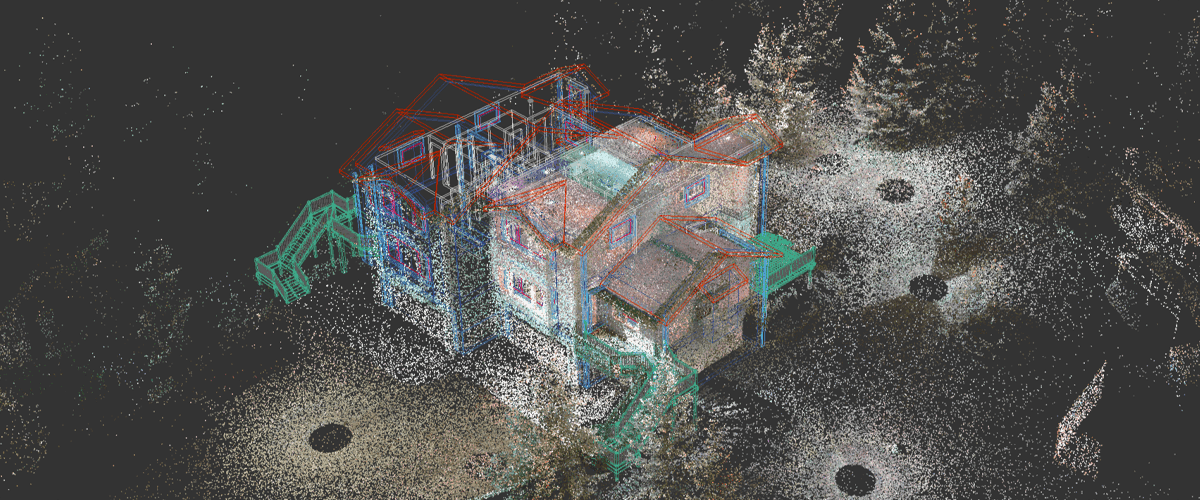
Image source: BricsCAD Blog
How Is a Point Cloud Created?
Point clouds are usually created using:
LiDAR scanners
3D laser scanners
Drone scanning
Photogrammetry from photos
Depth cameras and sensors
These tools scan surfaces and collect thousands or even millions of measurement points from the real world.
Point Cloud vs Mesh vs 3D Model
Feature | Point Cloud | Mesh | 3D Model |
Structure | Individual points | Connected polygons | Complete editable object |
Surface Information | No surfaces | Has surfaces | Full geometry and materials |
File Size | Usually very large | Medium | Depends on complexity |
Editing | Difficult | Easier | Fully editable |
Main Use | Scanning and capture | Visualization | Production and rendering |
Accuracy | Very high real-world accuracy | Processed version | Artist-created or optimized |
Point Clouds in Architecture and ArchViz
Point clouds are becoming very useful in architecture and visualization workflows because they help teams work with accurate real-world data.
Common uses include:
Scanning existing buildings before renovation
Creating Scan-to-BIM workflows
Capturing construction sites
Fast environment reconstruction
Preserving accurate measurements
Improving visualization accuracy
Reducing manual modeling time
What are the Challenges of Working With Point Clouds?
Even though point clouds are powerful, they also come with challenges:
Extremely large file sizes
Heavy GPU and CPU usage
Slow viewport performance
Noise and unwanted scan data
Difficult cleanup process
Long rendering times
Storage and hardware limitations
Large architectural scans can easily become difficult to handle on standard workstations.
How Cloud Rendering Helps With Point Cloud Workflows?
Cloud rendering makes point cloud workflows much easier by giving artists access to powerful remote hardware without upgrading their local machines.
Instead of struggling with massive scenes on a single computer, artists can use scalable GPU and CPU resources to process and render heavy projects faster and more efficiently.
For architecture studios and freelancers working with large scans, this can save a huge amount of time during tight deadlines.
How Flux Render Farm Can Help?
Flux Render Farm helps ArchViz artists and studios handle heavy rendering workloads with fast and scalable cloud rendering solutions.
With Flux Render Farm, you can:
Render large architectural scenes faster
Scale rendering power when needed
Reduce hardware limitations
Get predictable rendering costs
Meet project deadlines more efficiently
Handle complex visualization workflows with ease
Whether you are working on Scan-to-BIM projects, architectural visualization, or large environment scenes, cloud rendering can significantly improve your workflow.

Conclusion
Point clouds are changing the way architects, designers, and 3D artists capture and work with real-world environments. They provide highly accurate data and help speed up modern visualization workflows.
As projects become larger and more detailed, managing point cloud data also becomes more demanding. That is why cloud-based workflows and scalable rendering solutions are becoming increasingly important.
For ArchViz professionals, understanding point clouds today means being better prepared for the future of 3D visualization and digital architecture.
Frequently Asked Questions
What are the main components of a point cloud?
A point cloud mainly contains X, Y, and Z coordinates that define the position of each point in 3D space. Some point clouds also include additional data such as RGB color information, intensity values, surface normals, and depth information for better accuracy and visualization.
What are the most common point cloud file formats?
Some of the most commonly used point cloud file formats are:
PCD
PLY
LAS
E57
XYZ
These formats are used for storing 3D scan data in architecture, construction, engineering, and visualization workflows.
Where are point clouds commonly used?
Point clouds are widely used in many industries, including:
Architecture and ArchViz
Construction and BIM
Autonomous vehicles
Robotics
Gaming and VFX
AR/VR applications
Industrial inspection
Surveying and mapping
They are especially useful for capturing accurate real-world environments.
What is the best software for point cloud processing?
Popular software for point cloud processing includes:
Autodesk ReCap
CloudCompare
RealityCapture
Open3D
Point Cloud Library (PCL)
The best choice depends on your workflow, project size, and software compatibility.
Are point clouds difficult to render?
Point clouds can be demanding to render because they often contain millions or even billions of points. Large datasets require strong GPU and CPU performance, high memory capacity, and optimized workflows to maintain smooth performance.
Can point clouds be converted into 3D models?
Yes. Point clouds are often converted into meshes or full 3D models through a process called reconstruction. This helps artists and architects create editable geometry for visualization, animation, BIM, and rendering workflows.