What is a Render Farm and How Does it Work?
A render farm is a network of computers that work together to render 3D images, animations, and VFX faster.

Rendering is one of the most time consuming parts of any 3D project. Whether you are creating architectural visuals, animations, VFX, or product renders, a single scene can take hours or even days to finish.
This is where render farms help. Instead of using only one computer, a render farm uses multiple powerful systems together to complete rendering much faster.
In this blog, you will learn what a render farm is, how it works, and why many artists and studios use cloud rendering today.
What is a Render Farm?
A render farm is a group of powerful computers connected together to render 3D images, animations, and visual effects faster.
Instead of rendering a project on one PC, the work is divided across multiple systems called render nodes. Each node renders a part of the project at the same time, which saves a huge amount of time.
Render farms are commonly used in architecture, animation, gaming, product visualization, and VFX projects.
Why Do 3D Renders Take So Long?
3D rendering requires a lot of computer power because the software calculates lighting, shadows, reflections, textures, and effects in every frame.
High resolution images and animations increase render time even more. A single animation can contain thousands of frames that must be rendered one by one.
Complex scenes with detailed models, realistic materials, and advanced lighting also put heavy load on the CPU or GPU.
Because of this, rendering on a single computer can become very slow and affect your workflow.
How Does a Render Farm Work?
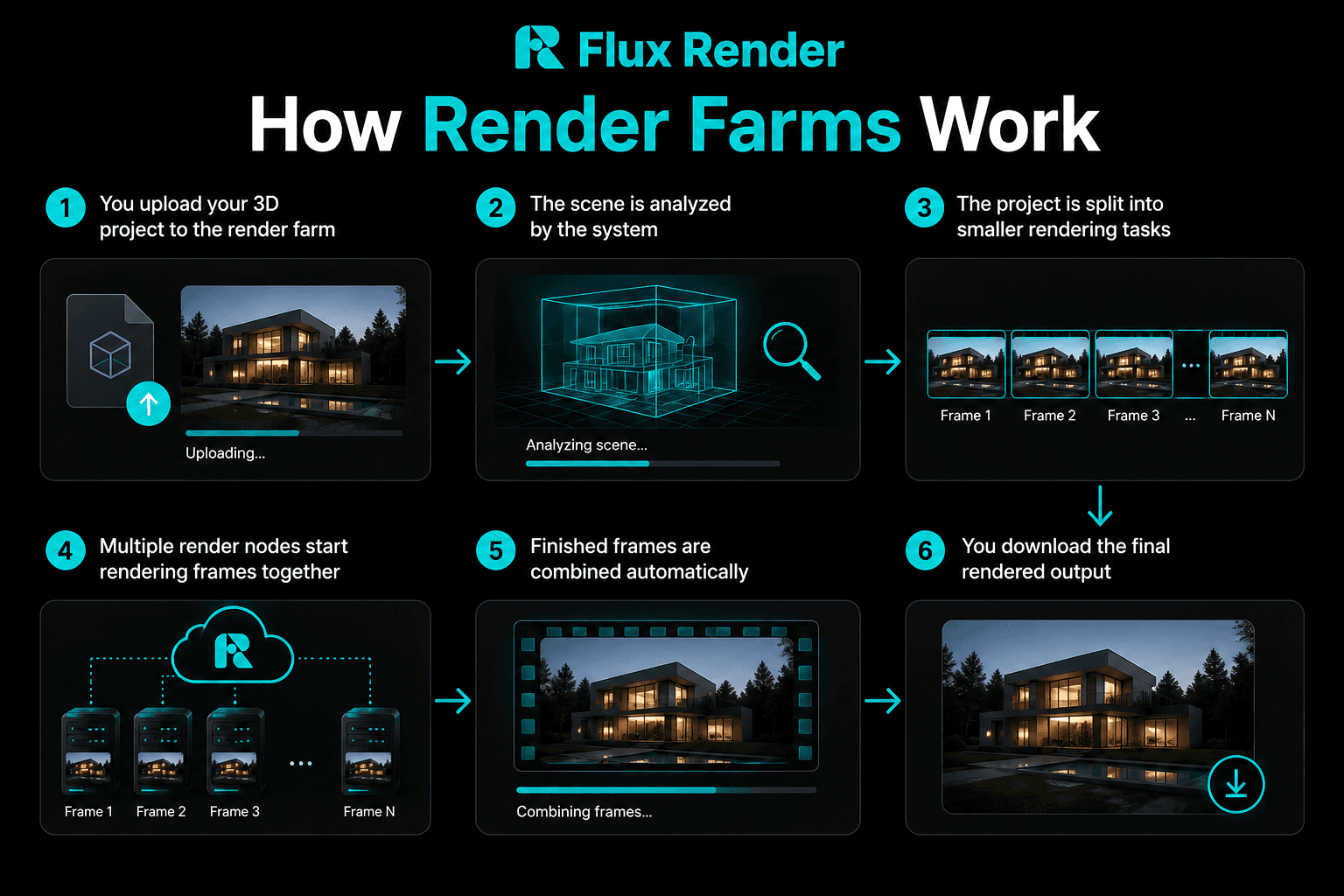
You upload your 3D project to the render farm
The scene is analyzed by the system
The project is split into smaller rendering tasks
Multiple render nodes start rendering frames together
Finished frames are combined automatically
You download the final rendered output
What is the Difference Between CPU vs GPU Render Farms?
Feature | CPU Render Farm | GPU Render Farm |
Processing Type | Uses CPU processors | Uses graphics cards |
Best For | Complex simulations and large scenes | Fast rendering and real time workflows |
Speed | Slower but stable | Much faster in many cases |
Software Support | Supports most render engines | Works with GPU based render engines |
Cost | Can be more expensive for long renders | Often more cost efficient |
Popular Engines | V-Ray CPU, Corona | Redshift, Octane, D5 Render |
Local Render Farm vs Cloud Render Farm
Feature | Local Render Farm | Cloud Render Farm |
Setup Cost | Very expensive | Low starting cost |
Hardware Maintenance | You manage everything | Provider manages systems |
Scalability | Limited by your hardware | Easily scalable |
Rendering Speed | Depends on your systems | Access to high end machines |
Accessibility | Only inside office or studio | Accessible from anywhere |
Upgrades | Expensive hardware upgrades | Always updated systems |
What are the Benefits of Using a Render Farm?
Faster rendering for images and animations
Save time on deadlines and client projects
Render large projects without slowing your PC
Access high end hardware without buying it
Scale rendering power anytime you need
Reduce electricity and hardware maintenance costs
Continue working while rendering happens in the cloud
How to Choose the Right Render Farm?
1. Check Software Compatibility
Make sure the render farm supports your 3D software and render engine.
2. Compare Render Speed
Look for providers with high performance CPU and GPU systems.
3. Understand Pricing
Choose a render farm that lets you estimate rendering cost before starting the project.
4. Test Before Using
A good render farm should offer free testing so you can check performance and workflow.
5. Look for Easy Workflow
Uploading, rendering, and downloading should be simple and beginner friendly.
6. Choose Reliable Support
Fast customer support is important when working on deadlines.
7. Try Flux Render
Flux Render offers cloud rendering with high end systems, easy workflow, cost and render time estimation before rendering, and free testing access for new users. It helps artists, architects, and studios render projects faster without investing in expensive hardware.
Conclusion
Render farms help artists and studios render projects much faster by using multiple computers together. They save time, improve workflow, and make large scale rendering easier.
Whether you are working on architecture, animation, or VFX, using a cloud render farm can help you finish projects faster and focus more on creativity instead of waiting for renders.

Frequently Asked Questions
What are Render Nodes?
Render nodes are individual computers inside a render farm that work together to render frames or images faster.
When Should You Use a Render Farm?
You should use a render farm for large projects, animations, tight deadlines, or when your PC takes too long to render.
How Much Does a Render Farm Cost?
Render farm cost depends on render time, hardware usage, and project complexity. Many cloud render farms offer pay as you use pricing.
Is a Render Farm Better Than a High-End PC?
For heavy projects and animations, a render farm is usually faster and more scalable than a single high end PC.
Which Software Works with Render Farms?
Most render farms support popular software like Autodesk 3ds Max, Blender, Maya, Cinema 4D, and render engines like V-Ray, Corona Renderer, and Redshift.
Are Render Farms Safe for Client Projects?
Most professional render farms use secure file transfer and data protection systems to keep project files safe.
Can Beginners Use a Render Farm?
Yes, many cloud render farms are beginner friendly and offer simple upload and rendering workflows.
How Fast is a Render Farm Compared to One PC?
A render farm can be many times faster than a single PC because multiple systems render frames at the same time.